
Designed & manufactured in Great Britain
+44 (0) 1443 813500 sales-uk@hotset.com

HSTC-T1 product configurator

BUILD YOUR
BAYONET THERMOCOUPLE

Select the engineering options that match your machine. The builder will guide you through compatible components and create the Hotset part number for your finished sensor.

Step 1 of 9 Cap / Adapter Fit
HSTC-T1 Type 1 Bayonet Assembly
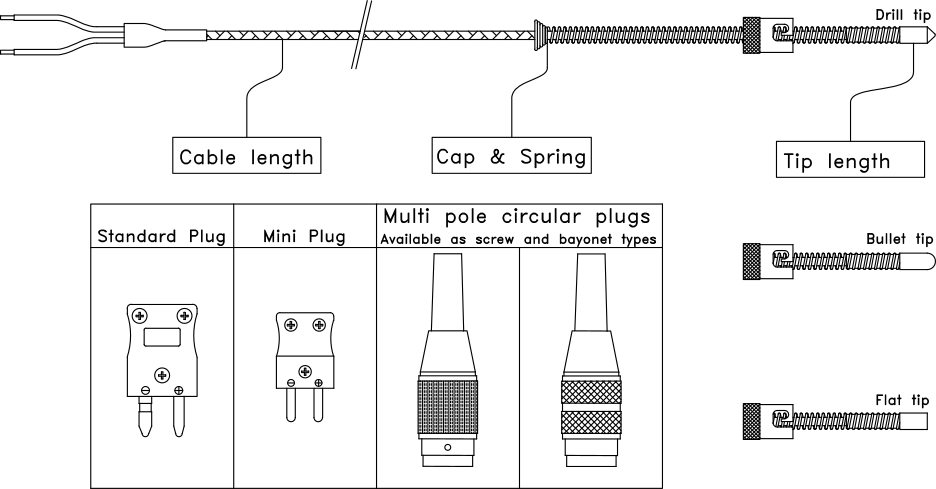
Technical illustration of a Hotset Type 1 bayonet temperature sensor assembly
Representative assembly shown. Your selections below define the finished sensor construction.
01

Start with the machine fitting

SELECT YOUR CAP / ADAPTER SIZE

Choose the cap that matches the bayonet adapter already fitted to your machine.

Slotted caps Choose the diameter and the required number of slots.
Pin caps Choose the diameter that matches the fitted pin-style adapter.
02

Filtered by your chosen cap

Select your probe diameter

Select a cap first to see the compatible probe diameters.

03

Matched to the cap assembly

Select your spring diameter

Select a compatible probe diameter first.

04

Define the measuring end

Select the probe tip and length

Choose the tip profile, then enter the finished probe length in whole millimetres.

mm
Whole millimetres only.
05

Select the sensing element

Select the sensor type

Choose the thermocouple or PT100 required by your process and compatible instrument input.

Temperature ranges are general capabilities. The permitted operating temperature depends on the complete probe, cable and termination construction.

06

Choose the measuring junction

Select the junction style

Select whether the measuring junction is connected to or electrically isolated from the probe.

07

Select the lead protection

Select the lead construction

Choose braided cable for flexibility or conduit cable for additional mechanical protection.

08

Set the finished lead length

Enter the cable length

Enter the required cable length in whole millimetres. The builder will create the L-code.

mm
Whole millimetres only.
09

Complete the connection

Select the termination

Choose how the sensor cable should connect to your equipment or instrumentation.

Stage 9
Select the termination

Your complete Hotset part number will appear in the configuration panel.